
Requirements in the workflow
Step-by-step documentation and content review help address configured audit and billing-manual requirements. Timing, service and claim checks support accuracy; they do not guarantee payment or an error-free note.
ONE CONNECTED CLINICAL WORKFLOW
Less re-entering. Less searching. More of the context providers and supervisors need, carried from enrollment through the visit, the note and the next review.
TAKE A LOOK AROUND
Try the same calendar, charts, provider directory, Practice Notes and billing components used in our app. Explore at your own pace—no account needed.
PRACTICE NOTES · AI AT THE POINT OF WORK
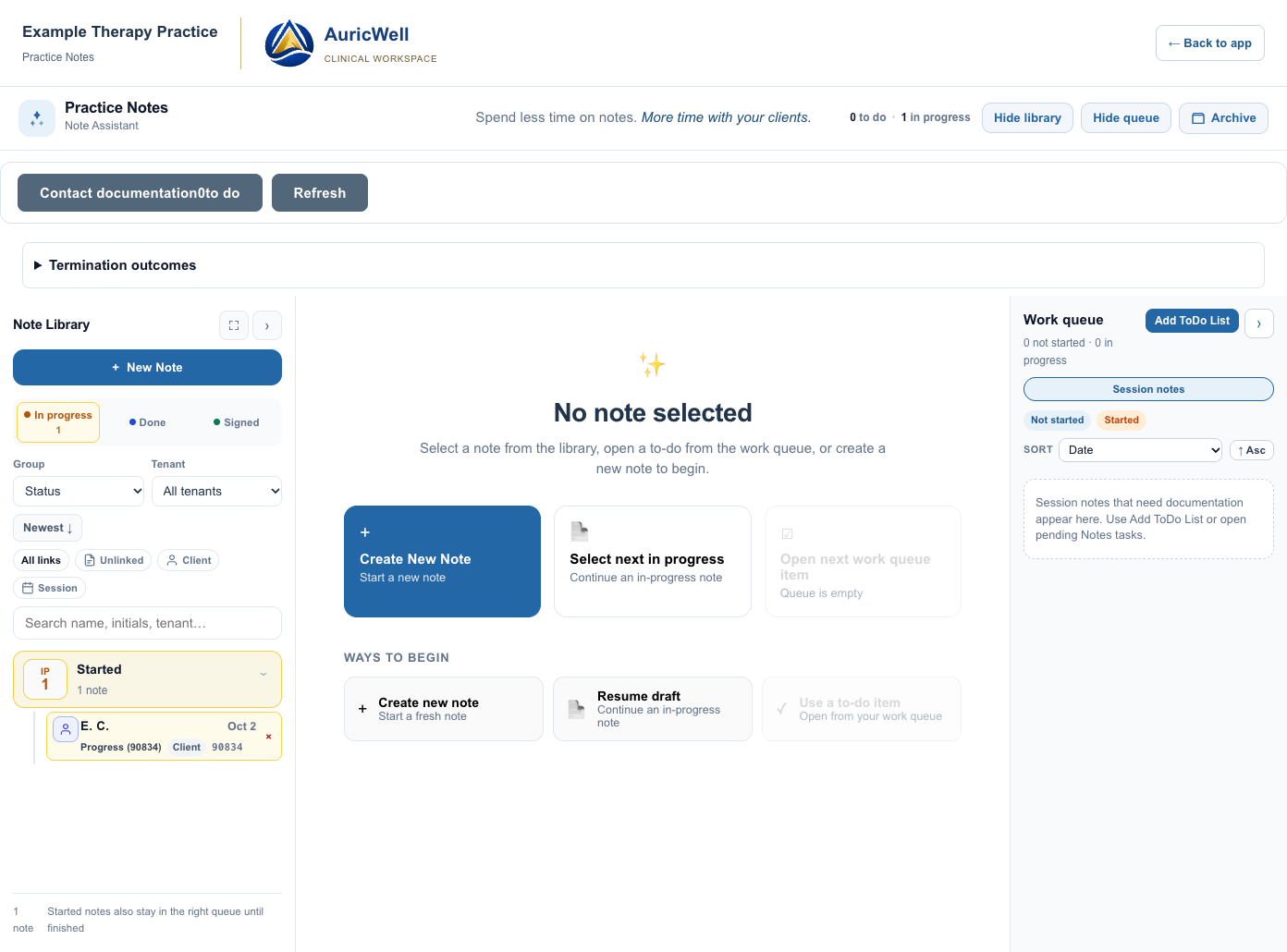
AI assistance is built into the documentation workflow. Use clinical context and, where enabled with signed acknowledgement, session transcription to support a draft. The clinician reviews the content before signing.
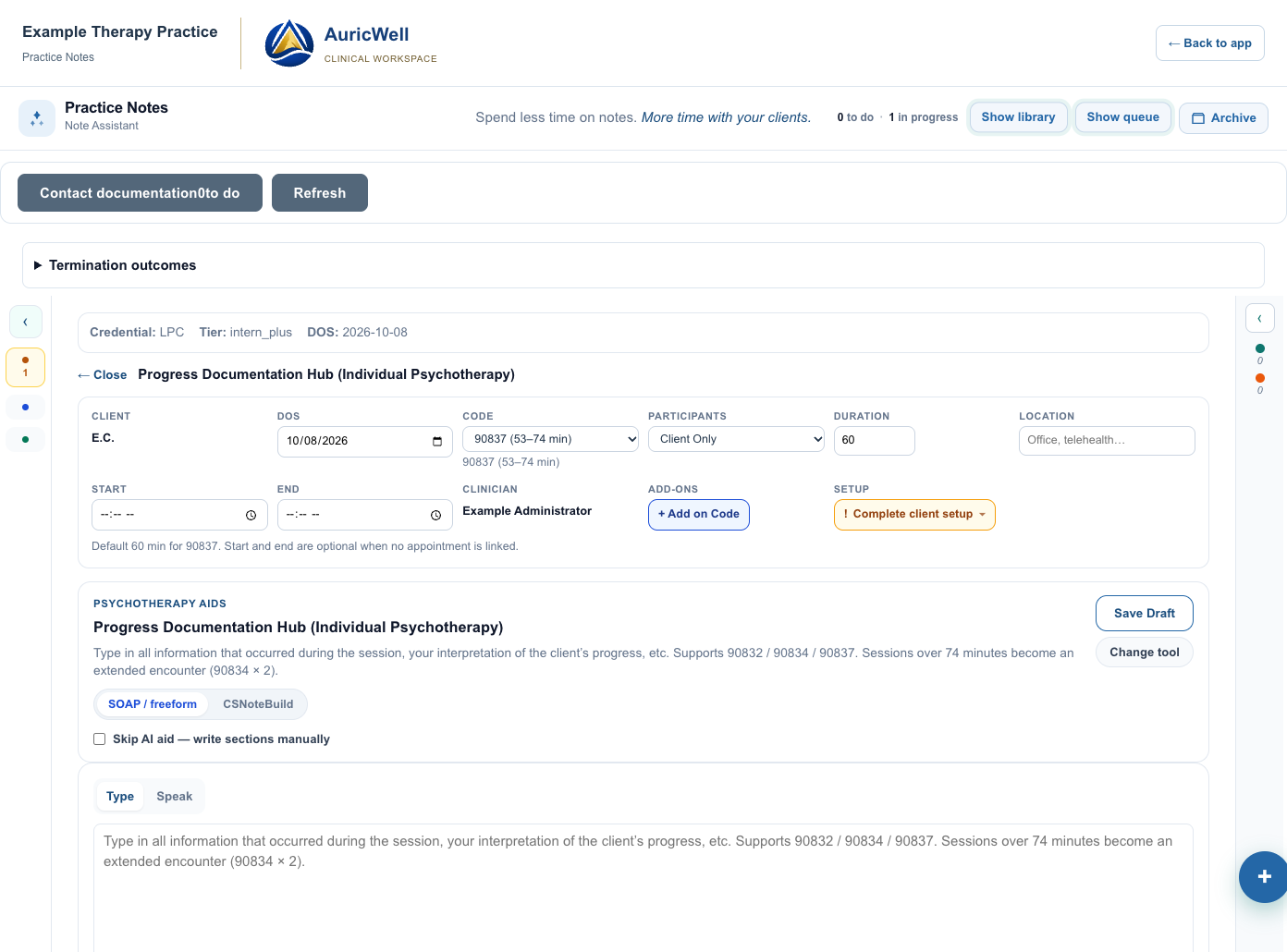
Confirm the client, service, timing and treatment focus.
Guided prompts organize interventions, response, progress and next steps.
Use AI to support the narrative, then check and edit the clinical content.
Complete the review, signature and billing requirements that apply.
Step-by-step documentation and content review help address configured audit and billing-manual requirements. Timing, service and claim checks support accuracy; they do not guarantee payment or an error-free note.
Add addenda, corrections and late entries to signed notes while retaining the original. Corrections return to the appropriate review workflow.
Review-only workflows can avoid a separate supervisor cosign where configured. Documents and amendments that require approval remain in the supervision queue.
A TREATMENT PLAN THAT STAYS IN THE CONVERSATION
Configurable treatment-plan sections, goals, objectives and rating scales support the way your practice documents care. Carry that context into notes and retain historical objective ratings across visits.
At check-in, ask about connection with the provider and perceived treatment progress. Compare the latest response with earlier feedback, alongside the clinical goal history.
Custom feedback supports the conversation. It is distinct from a validated outcome measure and from the clinician’s assessment.
Loading the app’s treatment-objective controls…
CARE STARTS BEFORE THE NOTE
Support clients and multiple guardians with distinct account relationships. Access follows authorization for each client, rather than giving every guardian the same unrestricted view.
Configurable enrollment links bring intake questions, digital forms and signed acknowledgements together. Shape the starting experience around the information your practice needs.
Let clients check in at the office and notify their provider that they have arrived. Include relevant check-in feedback so the visit can start with context.
A permanent provider office link and individual guest admission create a familiar place to meet. Premium supports one guest; Premium Plus supports additional individually admitted guests.
Waiting-room experiences include optional music. Shared session tools include games and whiteboard activities, with availability depending on the session type and enabled integrations.
In-person and virtual transcription workflows use the applicable signed acknowledgements and recording controls. Turn authorized transcripts into summaries and draft documentation.
These capabilities span the shared care platform. Their availability in an AuricWell practice depends on the configured workflow, integrations and rollout; a private office guest is not automatically connected to a client chart.
FROM THE WAITING ROOM TO THE PROVIDER
Follow a sample office arrival, then see the provider’s in-app alert and email fallback. Explore the proposed SMS format too. The AuricWell styling keeps the practice clearly identified.
Loading the office check-in example…
FROM FINDING A PROVIDER TO FINDING A TIME
Get to know a provider’s approach, explore their availability, and choose a time. Try the existing provider finder with fictional profiles and sample openings.
Loading the app’s provider cards…
THE CALENDAR BEHIND THE CARE
See the actual calendar and session-booking screen from the shared platform. Move between the captures to explore how appointments and scheduling sit together.
Loading calendar and scheduling examples…
These screens show existing shared-platform workflows with synthetic records. Scheduling access in AuricWell depends on your practice’s rollout readiness.
Configured text and email reminders let clients respond to upcoming appointments. Supported confirmation replies update the appointment, so the schedule shows which visits are client-confirmed and which are awaiting a response.
Configure reminder timing, templates and channels within platform controls and client preferences. Text delivery requires consent and an enabled messaging integration.
See office availability, assigned provider time, bookings and holds. Room reservations are a distinct workflow alongside the appointment calendar.
AI DOCUMENTATION INCLUDED AS STANDARD
Core documentation, client records, intake and guardian access sit together. Premium adds transcription and a private virtual office; Premium Plus adds room reservations and multiple individually admitted office guests.
The core clinical workflow.
Everything in Basic, plus:
Everything in Premium, plus:
Plan assignments follow the approved feature catalog. Shared features are assigned at practice level; private virtual offices are assigned to individual providers. Availability also depends on practice setup and rollout. Commercial terms are confirmed before contracting.
FROM SHARED CAPABILITIES TO YOUR PRACTICE
AuricWell uses the same underlying clinical records, documentation and billing services as the broader platform. The focused EHR experience brings those workflows together with AuricWell presentation.
The administrator preview is not a full customer launch. Confirm enabled features, credentials, agreements, integrations and the complete patient-to-payment workflow before cutover. A plan assignment alone does not activate an integration.
Walk through your requirementsTWO PATHS INTO AURICWELL
Configure your team, locations, services, fees, forms and agreements. New-practice setup is designed to stand on its own without historical records or a migration requirement.
Start with an export review. Staff, client and payer records, clinical documents, billing history and opening balances need mapping, review and reconciliation. Supported files and the cutover approach are confirmed for your current system; automatic integration with every EHR is not assumed.
A CLOSER LOOK AT THE WORKFLOW
Reminders, online requests and AI tools are available elsewhere too. Compare how the work fits together, then try the workflows that matter to your team.
AuricWell is currently an administrator preview. Its column describes existing shared-platform capabilities and explicitly labeled previews. Practice access requires rollout validation, agreements and configured integrations. Vendor features may depend on plan or add-ons.
| Workflow | AuricWell Shared platform / preview | TherapyNotes | SimplePractice |
|---|---|---|---|
| Text and email appointment reminders | Practice-configured notifications Choose channels, timing and message templates within platform controls and recipient preferences. | Available Email, text and phone reminders, with preferences for clients and their contacts. Vendor documentation ↗ | Available Customizable email, text and voice reminder templates. Vendor documentation ↗ |
| Client confirmation on the schedule | Replies update appointment status Supported confirmation replies mark the appointment client-confirmed. The calendar distinguishes confirmed visits from those awaiting a response. | Specific workflow not verified The reminder guide does not establish client SMS confirmation updating a calendar status. Confirm this detail with TherapyNotes. Vendor documentation ↗ | Available Text and voice confirmations appear in the calendar, client overview and daily agenda. Vendor documentation ↗ |
| A public path into care | Enrollment + provider availability Configurable enrollment links, intake forms and acknowledgements, alongside provider profiles and published openings. Placement follows practice review. | Public appointment requests TherapyPortal can let anyone view and request appointments without signing in. Portal forms support intake. Vendor documentation ↗ | Public appointment requests Prospective clients can request appointments. An external website widget is documented for the Plus plan. Vendor documentation ↗ |
| AI documentation and transcription | Inside Practice Notes Guided sections, treatment context and AI drafting in the note workspace. Authorized transcription supports drafts; clinicians review the result. | TherapyFuel AI progress notes from summaries or transcripts, treatment plans and other documentation tools. Vendor documentation ↗ | Note Taker Session transcription and AI-assisted documentation. Review the current plan and consent requirements. Vendor documentation ↗ |
| Office kiosk and provider arrival alerts | Client self check-in Choose the provider and visit; create an in-app arrival alert with an email fallback. Optional check-in feedback adds context. Provider SMS is a preview. | Staff-entered check-in The documented approach uses an Appointment Alert entered by staff, visible on the clinician’s calendar. Vendor documentation ↗ | Not verified We did not verify a native self-service office kiosk with this provider-arrival workflow in the public documentation reviewed. |
| Physical office and room scheduling | Dedicated office workflow Room availability, provider assignments, bookings and holds, with an office directory. Access depends on the practice plan and setup. | Location-based schedules Clinician availability can include locations and visit modes. A dedicated room-reservation workflow was not verified. Vendor documentation ↗ | Rooms as office locations The documented approach creates a location for each room, then filters the group calendar to see availability. Vendor documentation ↗ |
“Not verified” means we could not confirm that specific workflow in the public documentation reviewed; it does not mean the vendor cannot provide it. This is a focused workflow comparison, not a complete feature inventory or a guarantee of clinical or billing results. Product names belong to their respective owners.
We reviewed the official guides below, including scheduling, portal and reminder instructions. We did not treat an appointment request as a complete enrollment workflow, or a location calendar as identical to a room-reservation system. Confirm current capabilities directly with each vendor.
FREQUENTLY ASKED QUESTIONS
From the first appointment to the signed note, here is what to expect.
The focus is the connected workflow: guided Practice Notes, treatment-goal history, supervision queues, configurable enrollment, provider availability and office check-in. Try the examples to see how those pieces fit your practice. We do not claim to be the only EHR with AI, reminders or online requests.
The shared scheduling workflow supports confirmation replies and shows client-confirmed status on the schedule. Practice settings govern reminder timing, templates and enabled email or text channels, subject to recipient preferences and consent. Confirm these integrations for your AuricWell rollout.
The client selects their provider and scheduled visit. The office workflow creates an in-app arrival alert, with a pending email fallback if it is not acknowledged and email is enabled. Optional feedback can capture connection and treatment progress. The provider SMS shown here is a preview, not an active kiosk delivery channel.
The shared platform supports configurable public enrollment links, intake forms and signed acknowledgements, plus provider profiles and published availability. Your practice reviews placement and configures the information and forms it needs. An appointment request is not automatically a confirmed placement.
Yes. The shared care platform supports separate client and guardian relationships, including multiple guardians. Access depends on each guardian’s authorization for that client; it is not blanket access to every record or document.
Yes. AI helps create a draft. The clinician reviews and edits the content before signing. Transcription and AI services require the applicable configuration, agreements and acknowledgements. Guided documentation remains useful without AI generation.
No. A configured review-only workflow can avoid an additional cosign where it is appropriate. Required approval and signature rules still apply to the clinician, service, payer and document. AuricWell does not remove a required cosign.
The shared clinical tools support configurable plan sections, goals, objectives and rating scales, with historical ratings across visits. Signed notes can receive addenda, corrections and late entries while retaining the original and following the applicable review workflow.
No. Guided sections and configured timing, service and claim checks help identify missing requirements. Clinical accuracy, appropriate coding, required signatures and payer decisions still need professional review. No software can promise every note or claim will be error-free.
Yes—that is the new-practice onboarding path. It begins with the team, locations, services, fees, forms and agreements. Historical records and migration completion are not prerequisites. Customer rollout still requires the full operational workflow to be ready.
Begin with the exports available from your current system. Staff, clients, payers, clinical documents, billing history and opening balances need mapping, review and reconciliation before cutover. Compatibility is reviewed first; a direct connection to every EHR is not assumed.
The website shows an administrator preview and existing shared-platform workflows. Feature access depends on the practice’s plan, configuration and rollout readiness. Commercial terms are agreed before contracting; no prices or payment details are requested on this website.
No. Your practice provides care. AuricWell provides the software experience; the actual treating practice and relevant legal parties remain identified in patient agreements.

Connected communications in AuricWell
Keep care conversations and the work around them connected. Messages by Conversa brings secure client messaging, email, care-team coordination, team texts, and polls into AuricWell.
Explore Conversa

Client and guardian conversations have a distinct secure space, authorized shared access, activity logging, and medical-record tracking. Email and text alerts never include the secure message.

Read, reply, organize threads, and work with attachments alongside your other communications. The sending organization and address remain clear.

Send team updates, collect votes or written answers, review replies, and share results. Superadmins, admins, and support manage these tools; intended recipients can respond.

Use internal messages, groups, channels, and reply threads to coordinate work. Client and guardian conversations use the secure-message channel.

Move between calls, voicemail, tickets, SMS, and announcements within the communications workspace, with the appropriate channel and sender identified.

Recognize organization identities, message types, unread states, and delivery history across AuricWell and Plot Twist HQ.
Secure messagesEmail Internal messagesTeam texts & polls
 Chat
Chat ThreadsChannels
 TicketsCalls
 Voicemail
 SMS
SMS Announcements
Conversa and AuricWell are wholly owned Plot Twist Co. products. Conversa is integrated with both AuricWell and Plot Twist HQ.
Available channels depend on your organization’s enabled features and integrations. Team texts and poll texts follow recipient consent and delivery preferences.
OPTIONAL ADD-ON · AURICWELL OFFICE
Give each building a welcoming tablet kiosk connected to your practice’s schedule. Keep your spaces, providers and arrivals together in AuricWell.
Manage office spaces, recurring assignments and bookings in the app. Shared buildings retain each organization’s identity.
Clients choose their provider and appointment, complete optional feedback and wait in the lobby. Providers receive an arrival alert; room details stay in the directory.
Connect bookings to appointments and clinical workflows. Google Calendar is an optional integration, not a requirement for scheduling or kiosk check-in.
Office add-on availability depends on your practice’s plan and configuration.
Ask about AuricWell OfficeA LITTLE MORE CLARITY. A LITTLE MORE SPACE.